

Key Takeaways
- Free to play on this page. No download, no sign-up, no time limit.
- Controls: arrow keys or W / A / S / D on desktop, tap or swipe on touchscreens.
- Each apple adds one segment. Hitting a wall or your own tail ends the run immediately.
- The gear icon opens seven rows of settings — fruit, board mode, apple count, speed, board size, snake color and theme — plus a randomizer. Most players never open it.
- There is no pause. Once a run starts it does not stop until you crash.
- Snake is the most played videogame of all time, with an estimated 1 billion players, according to Guinness World Records.
This page covers the game exactly as it runs here: its controls, its settings, the tactics that work, and where it came from. It is not a guide to the community Mod Menu, and it does not track live leaderboards — the sections on mods and world records below explain why.
What Is Google Snake?
Google Snake is a single-player arcade game played on a rectangular grid. Your snake moves forward on its own, one cell at a time, and never stops. All you control is which direction it turns. Somewhere on the board sits an apple. Reach it and two things happen at once: your apple counter goes up by one, and your snake grows one segment longer.
That growth is the whole game. A three-segment snake has the entire board to work with. A forty-segment snake has to thread through a maze it built itself, and the only thing that can kill you at that point is your own tail. The rule is unforgiving in both directions — run into the fence around the board, or into any part of your own body, and the run is over on the spot with no lives and no continues.
The counter in the top-left corner tracks the current run. Next to it, a trophy holds your personal best, and it stays there between runs, so the number to beat is always on screen.
How to Play (Controls)
| Platform | Controls | How we know |
|---|---|---|
| Desktop | Arrow keys or W / A / S / D to turn | Verified by us: all eight keys tested |
| Touchscreen | Tap or swipe in the direction you want to go | The game's own on-screen hint shows arrow keys beside a pointing-finger icon; not tested by us |
Three rules decide every game:
- The snake never stops moving. You steer, you do not accelerate or brake. Turning is the only input the game accepts.
- You cannot reverse into yourself. Pressing the direction directly behind you does nothing, which is a mercy rather than a limitation.
- There is no pause. We tested both the spacebar and clicking the board mid-run, and neither stops the snake. Start a run only when you can finish it.
How we checked this
Everything above comes from playing the game on this page, not from reading someone else's description of it. On August 21, 2026 we opened the game on its own and played roughly ten runs, pressing each of the four arrow keys and each of W, A, S and D in turn and watching which way the snake went. All eight worked, and they work interchangeably inside a single run. We then ran two separate pause tests — one pressing the spacebar mid-run, one clicking the board — and in both the snake carried on and died at the fence.
Two things we deliberately do not claim. We give no grid dimensions, because the board stretches to fit whatever window it is in and its size is a setting anyway. And we never got a snake long enough to run into its own tail, so that rule is stated on the authority of the genre rather than our own crash.
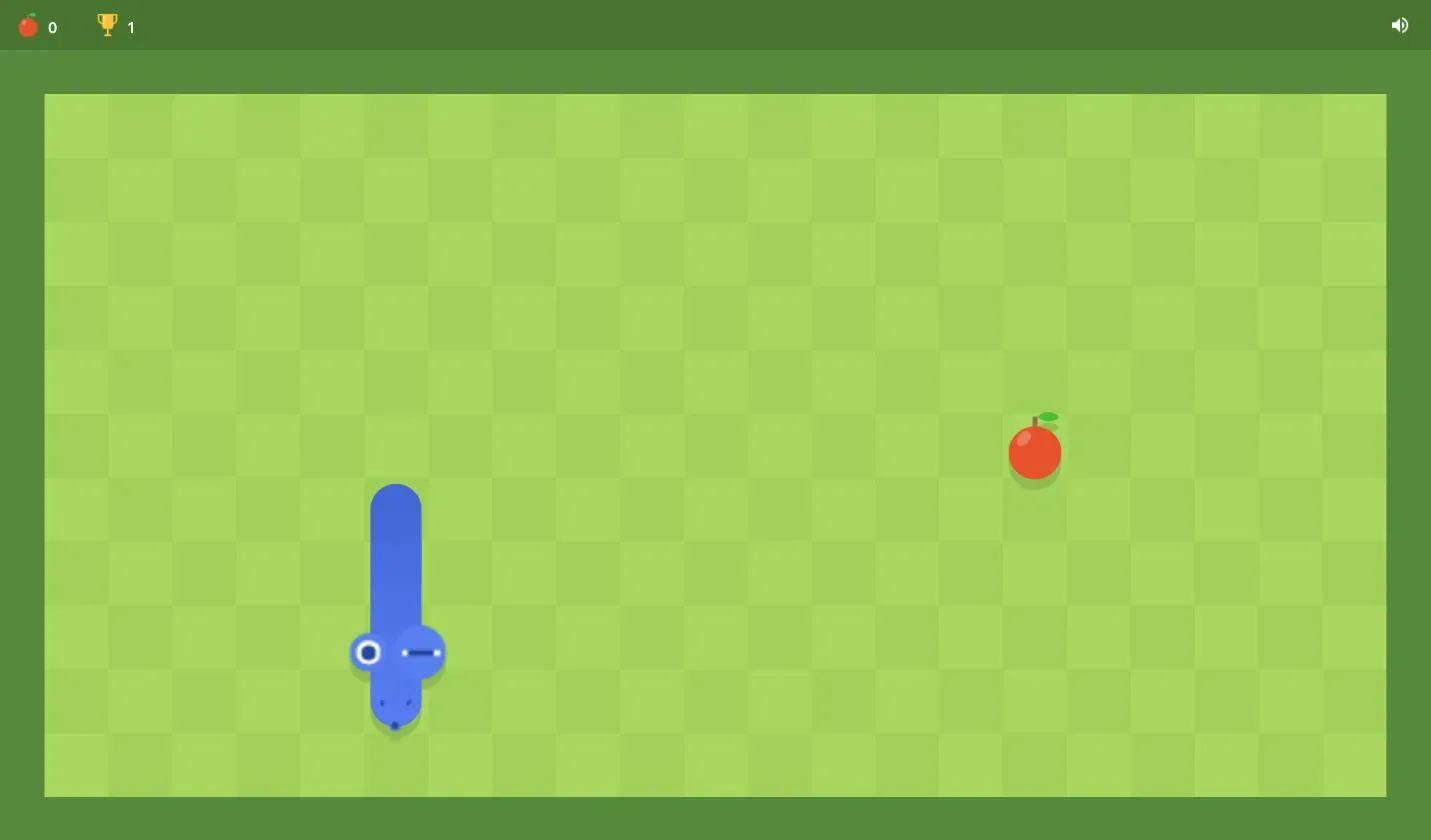
A run in progress on this page's game, captured August 21, 2026. The apple counter and the trophy holding your personal best sit in the top bar.
Every Setting the Game Hides
Press the gear icon on the start screen and the game opens a panel most players never see. It holds seven rows of options, and each row scrolls sideways, so the three or four icons you see first are not the whole list. There is also a dice button beside Play that rolls a random combination for you.
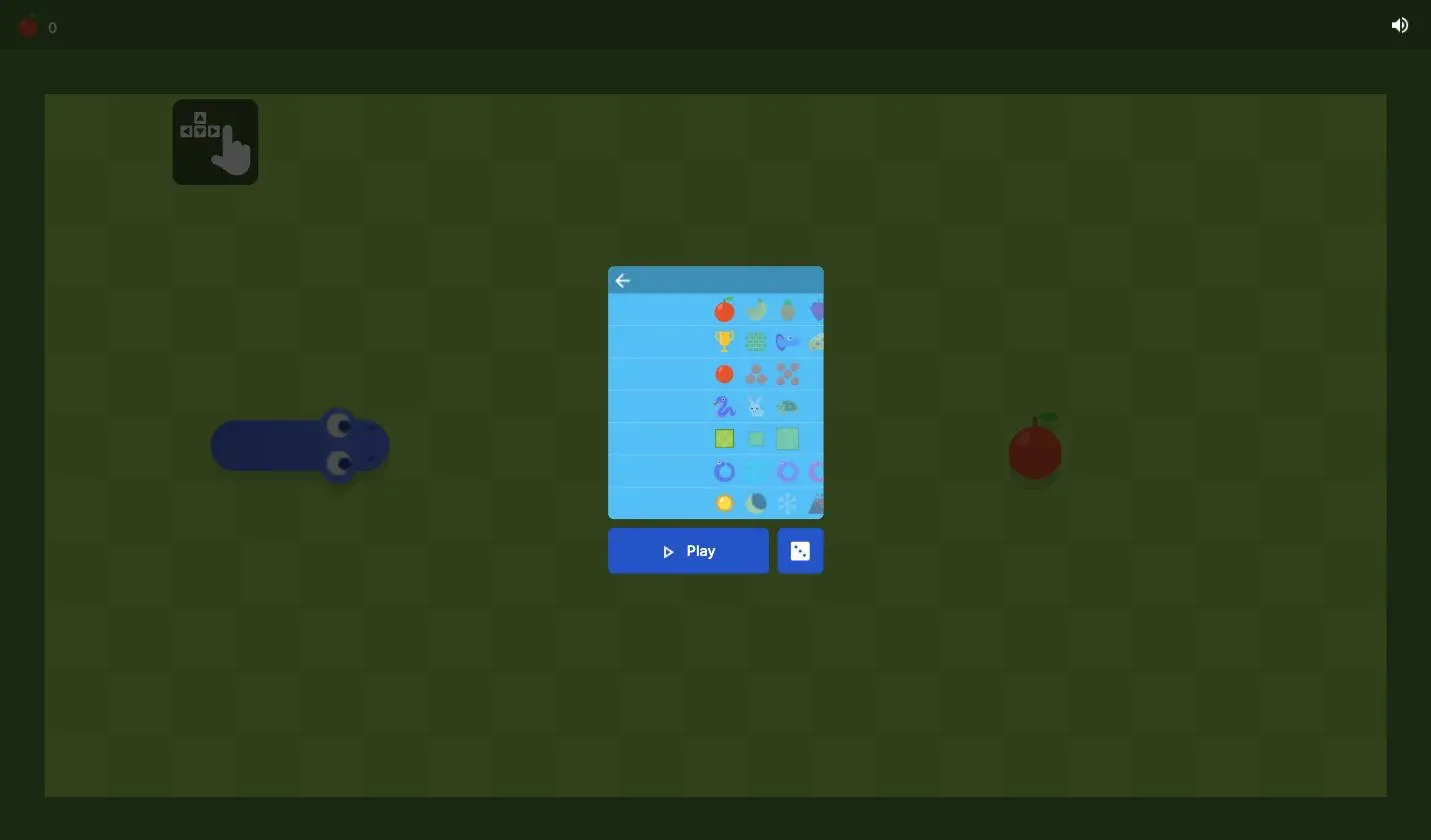
The settings panel on this page's game, captured August 21, 2026. Every row scrolls horizontally for more options.
| Row | What it changes | What we found |
|---|---|---|
| 1 | Fruit | Apple, banana, pineapple, grape and more; scrolling revealed further fruit past the four shown |
| 2 | Board mode | Classic (trophy), a walled board, a portal board, a cheese board, and twin-snake variants further along the row |
| 3 | Apple count | Three options: one apple at a time, or several on the board at once |
| 4 | Speed | Three options: snake (normal), rabbit (fast), turtle (slow) |
| 5 | Board size | Three sizes, from a tight board to a wide one |
| 6 | Snake color | Several color options for your snake |
| 7 | Theme | Sun, moon, snowflake and mountain backgrounds |
Two of these change the game rather than the decoration. Speed is the practice dial: turtle gives you time to plan a turn instead of reacting to one, which is how you learn corners. Board mode changes the rules outright — the portal board lets you leave one edge and reappear at the opposite one, which turns the fence from a hard boundary into a shortcut.
Board size is the setting that quietly decides your ceiling. A bigger board holds more cells, so a perfect run on it is worth more apples than a perfect run on a small one.
Tips That Actually Raise Your Score
- Hug the edges early, keep the middle open. Apples appear anywhere. If your body is coiled around the perimeter, you always have a clear lane through the center to reach one.
- Turn one cell early, not at the last moment. The snake commits to a turn the instant you press. Queuing the turn slightly before the corner costs nothing; queuing it late costs the run.
- Build in tight rows, not loops. Sweeping back and forth in a serpentine pattern packs your tail against itself and leaves the maximum usable space. Big lazy circles waste the board.
- Practice on turtle speed before chasing a score. Normal speed crosses a wide board in a few seconds, fast enough that beginners lose most runs to the fence rather than to their own tail.
- Watch your tail, not the apple. Past twenty segments the apple is rarely the thing that kills you.
What About Google Snake Mods?
"Google Snake mods" is one of the most-searched things about this game, so here is the straight answer: the game on this page is Google's official build, with Google's own settings menu — not the community Mod Menu.
The Mod Menu people are searching for is a separate browser extension and userscript project, distributed independently, that unlocks extra board modes and cosmetics. It is not part of this page and we do not ship it.
What is worth knowing is that a good share of what players want from mods is already sitting behind the gear icon: different board modes, board sizes, speeds, apple counts, snake colors and fruits, in the official game, with nothing to install. If you have been hunting for a modded version because you wanted more variety, open the settings panel first — it is a longer list than it looks, because every row scrolls.
Where Google Snake Came From
The game is much older than Google. According to Wikipedia, the Snake genre began with Blockade, a 1976 arcade game written by Lane Hauck and Ago Kiss for Gremlin Industries. It went from arcade curiosity to global habit in 1998, when Snake shipped preinstalled on the Nokia 6110 and, through successive handsets, reached an estimated 1 billion people — enough for Guinness World Records to recognize Snake as the most played videogame of all time.
The phone version was designed by Nokia engineer Taneli Armanto, who had to fit it into a display of 48 × 84 black-and-white pixels and a very small amount of memory. Interviewed by It's Nice That, he explained that he built in a fractional delay before a crash so players had a few milliseconds to react — "why wouldn't we help the players a little and thus lessen their possible frustration?" That instinct is why the game still feels fair rather than punishing, decades and several rewrites later.
Google's own version arrived in 2013, launched as a browser easter egg. Snake then turned up inside Google Maps as an April Fools' prank in 2019, and Google relaunched the doodle version in January 2025 to mark the Year of the Snake. (Dates per Snake (video game genre), Wikipedia, retrieved 2026-08-21.)
Play Google Snake Now
Scroll back to the top, press Play, and start collecting apples. It is already loaded and it is free. When the classic board starts feeling familiar, open the gear icon and change the mode, the speed or the board size; it is the same game with a different problem to solve. More classics are waiting in our free games library, and the game wiki has background on the rest of them.